Background
- enables the client to script data transfers via JS
- one of the key technologies behind the Asynchronus JS & XML (AJAX) revolution
- prior to XHR, the web page had to be refreshed to send or fetch and state updates between the client and the server - XHR enables interactive web apps in the browser
Cross-Origin Resource Sharing (CORS)
- motivation is simple - browser stores user data, such as authentication tokens, cookies, and other private metadata, which cannot be leaked across different applications
- eg. without the same origin sandbox, a script on example.com would be able to acces and manipulate data on thirdparty.com
- CORS provides a secure opt-in mechanism for client-side cross-origin requests
- uses the same XHR API, except that the URL to the requested resource is associated with a different origin from where the script is being executed
- opt-in authentication is handled at a lower level - when the request is made, the browser automatically appends the protected Origin HTTP header, which advertises the origin from where the request is being made
- the remote server is able to examine the Origin header an decide if it should allow the request by returning an Access-Control-Allow-Origin header in its response
- if the remote server wanted to disallow access, it could just omit the header
- CORS some additional security precautions to ensure the server is CORS aware
- omit user credentials such as cookies & HTTP authentication
- client is limited to issuing “simple cross-origin requests” - restricts the allowed methods (GET, POST, HEAD) and access to HTTP headers that can be sent and read by the XHR
- to enable cookies & HTTP authentication, the client needs to set an extra property (withCredentials) on the XHR object when making the request, and the server must respond with an appropriate header (Access-Control-Allow-Credentials) to indicate it is knowingly allowing the application to include private user data
- similarly, if the user wants to use a “non-simple method” for the request, it needs to ask for permission first with a preflight request
- this adds one RTT latency to verify permissions - but it can be cached by the client to avoid the same verification on each request
- view W3C CORS specification to define when and where a preflight req must be used
Downloading Data with XHR
- XHR can transfer both text-based and binary data - the browser offers automatic encoding and decoding for some native data types, which allows the application to pass these types directly to XHR to be properly encoded, and vice versa
- ArrayBuffer: fixed-length binary data buffer
- Blob: binary large object of immutable data
- Document: parsed HTML or XML document
- JSON: javascript object representing a simple data structure
- Text: a simple text string
- the browser can either rely on the HTTP content-type negotiation to infer the appropriate data type (eg. application/json), or the application can explicitly override the data type when initiating the XHR request
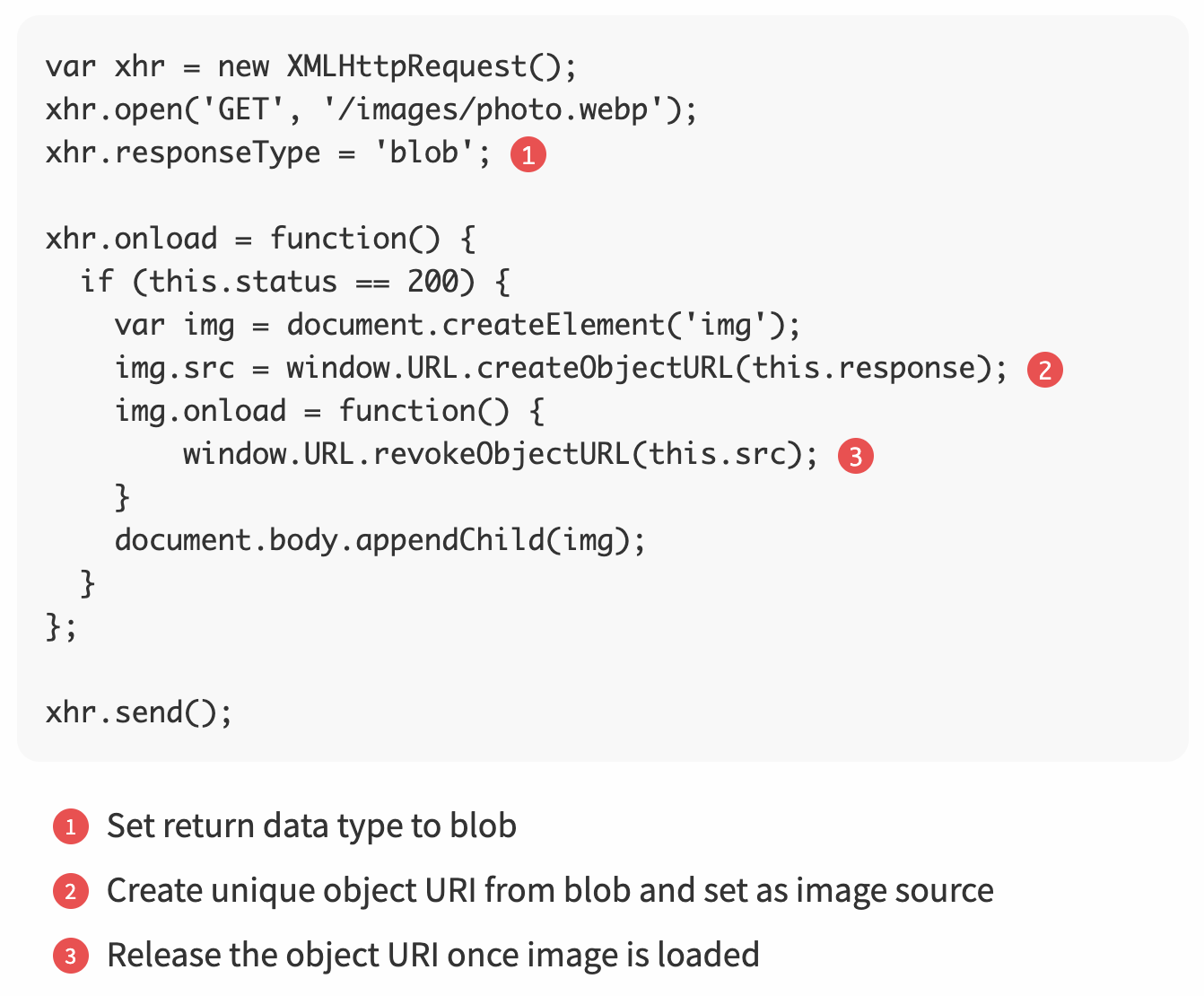
- note that we are transferring an image asset in its native format, without relying on base64 encoding, and adding an image element to the page without relying on data URIs.
- no network transmission overhead or encoding overhead when handling the binary data in JS - more efficient and dynamic
Uploading Data with XHR
- uploading data is very similar, the only difference is that we pass in a data object when calling send() on the XHR request
- accepts one of DOMString, Document, FormData, Blob, File, or Array Buffer objects
- automatically sets the appropriate HTTP content-type, and dispatches the request
Monitoring Download & Upload Progress
- the XHR object provides an API for listening to progress events
- the application can register a set of JavaScript event listeners on the XHR object
Streaming Data With XHR
- there is no simple, efficient, cross-browser API for XHR streaming
- the send method expects the full payload in case of uploads
- the response, responseText, and responseXML attributes are not designed for streaming
- there is limited support for streaming downloads with XHR
- subscribe to state & progress notifications → extract new data from partial response, update processed byte offset
- performance is not great, and there are a large number of implementation caveats
- responseText is still buffering the full response! - issue when download is large, or memory is constrained
- the only way to release the buffered response is to finish the request and open a new one
- partial response can only be read from the responseText attribute, which limits us to text-only transfers
- once partial data is read, application logic must define its own format and then buffer and parse the stream to extract individual messages
- browsers differ in how they buffer received data - release data immediately vs. buffer small responses and release in larger chunks
- browsers differ in which content-types they allow to be read incrementally - eg. some only allow text/html, while other only work with application/x-javascript
- responseText is still buffering the full response! - issue when download is large, or memory is constrained
Real-time Notifications & Delay
- how can the server notify the client if data is updated on the server?
- HTTP does not provide a way for the server to initiate a new connection to the client
- either leverage a streaming transport or poll the server for updates
Polling with XHR
- let the client initiate a background XHR request on a periodic interval
- good for applications where (1) polling intervals are long, (2) new events arrive at a predictable rate, and (3) transferred payloads are large
- (3) is due how each XHR request is a standalone HTTP request, which incurs ~800 bytes of overhead for request/response headers
Long-Polling with XHR
- instead of returning an empty response when no updates are available, keep the connection idle until an update is available
- data is sent immediately when it is available on the server - offers the best case scenario for message latency
- eliminates empty checks, which reduces the number of XHR requests and the overall overhead of polling
- unless the message arrival rate is known and constant, long-polling will always deliver better message latency
- however, each delivered message still incurs the same HTTP overhead - so if the message arrival rate is high, long-polling will issue more XHR requests than periodic polling
- simple polling allows for “message aggregation”
- in practice, not all messages have the same priority or latency requirements - use a mix of strategies
- leveraging a long-held HTTP request (“a hanging GET”) to allow the server to push data to the browser is commonly known as “Comet”, or “reverse AJAX”, “AJAX push”, “HTTP push”
- trivia: Facebook’s Chat (2008) used long polling to get messages!
- today, Server-Sent Events and WebSocket are more efficient - but long-polling is used as a fallback strategy